What is the DTF color chart?


Free Sample Pack
The chart is a regular DTF transfer, 23 inches square, printed with our 9-color RGBO ink set on instant peel film. It arrives powdered and cured like any order. You press it, and from then on you have a physical reference for how our printers reproduce 1,358 colors on fabric, with the hex code printed under each swatch.
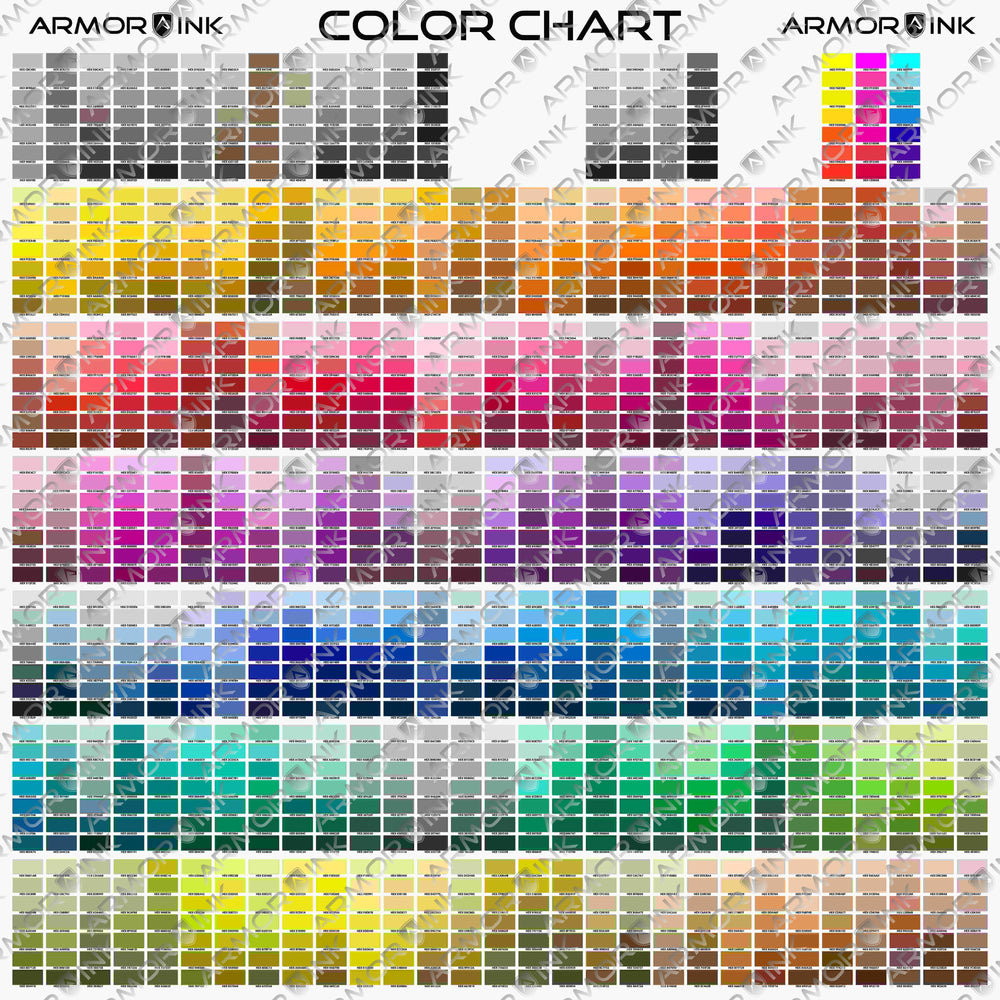
Ten minutes with the chart saves a reprint on every job where the client cares about the exact shade.
Every monitor shows color with light; a transfer shows it with ink on film pressed into fabric. The only reference that matches our printers is a swatch that came off our printers.
| Picking from the pressed chart | Picking from a screen | |
|---|---|---|
| Reds, oranges, greens | Shows exactly what our 9-color RGBO set prints, including shades CMYK cannot reach | Looks different on every screen |
| Light | Judge it in daylight, shop light or stadium light, next to the garment | Backlit at whatever brightness the screen is set to |
| Fabric | Press panels on the shirts you sell and see the real result | No way to preview a color on fabric |
| Consistency | Same hex code gives the same result on the next order | Depends on which device the client used |
| Cost of a miss | $2.99 once | A reprint, a day and an unhappy client |
Every chart is printed in our own shop in Ellinwood, Kansas and leaves by UPS within 24 hours on business days. Central shipping means two to three days to most of the country.
We print on instant peel film with our 9-color RGBO ink set and hot melt powder, on industrial roll-to-roll printers and shakers. The same supplies we sell to other print shops.
One avoided reprint covers the chart many times over. It counts toward free shipping at $75 and toward the 5% to 25% order discounts.
Email or call and you reach the people who printed your order. If a print is wrong because of something we did, we reprint and reship it at no cost.

The chart is 23 inches square, so use a 4XL or larger shirt and a 16 by 20 press in two passes, or cut the chart into panels. Then press it like any of our transfers.
Did not transfer? More pressure and 5 more seconds, then raise the temperature 10°F at a time. Full tips, troubleshooting and wash care are on our how to press page. New material? Do a test press first.
No reviews yet for the color chart. We ask every buyer for one by email after delivery, so check back soon.